
 Ticket 48213

On this page
Open the customer in Stripe and list their charges for that period. If you see two charges for the same amount a few seconds apart, rule out a double-click by checking how many checkout requests there were, then look for a retry: a timed-out request or webhook that ran twice. Refund the second charge, then reply with the amounts, times and refund ID.
"I was charged twice" is one of the few tickets where a slow answer costs trust and money. Here's a process that gets it right the first time. 👇
Key takeaways
- Confirm both charges first: amount, time, card and status.
- Rule out a double-click: one checkout request means the customer didn't do it.
- Look for a retry: a timed-out request or webhook that ran again is the usual cause.
- Reply with proof: amounts, timestamps, refund ID, and what happens next.
- ✨ Supahelp is another option: a desktop app built to run these steps across your helpdesk, Stripe and monitoring tool on your own Claude plan, and to ask before any refund.
Why do duplicate charges happen?
Most duplicate charges come from a retry: a payment request or a webhook that ran twice after a timeout.
Two common versions:
- A retried payment request. Stripe supports idempotency keys so you can safely retry a request without doing the same operation twice. If your code sends the same key on a retry, Stripe returns the first result. Without one, Stripe creates a second payment.
- A webhook that ran twice. In live mode, Stripe attempts to deliver an event for up to three days with exponential backoff. If your endpoint times out after doing its work, Stripe sends the event again, and a handler that isn't safe to run twice creates a second invoice.
Other causes: a customer double-clicking "Pay" on a form with no guard, or a pending authorisation that looks like a second charge on their bank statement.
Step 1: Find both charges
In Stripe, search the customer by email and filter payments to the date they mention. Note for each: amount, created time, card, status and invoice or payment intent ID.
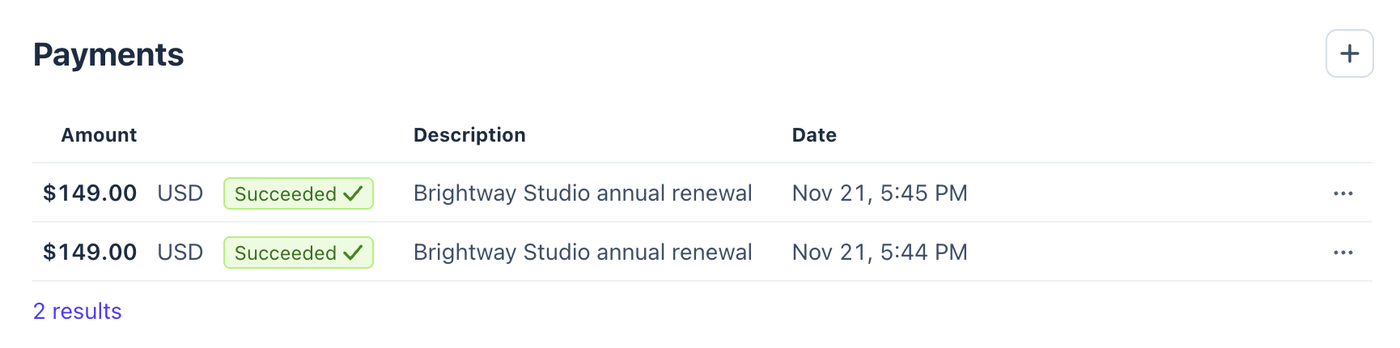
If you only see one, it's likely a pending authorisation on their bank statement. Tell them it will drop off.
Step 2: Rule out a double-click
Check your monitoring or logs for the checkout request in that window. In the example case below, New Relic showed only one checkout request, so the customer didn't click twice.
Step 3: Find the retry
Look at what happened around the first charge. In the example case, the annual plan renewed, the webhook timed out, and Stripe retried it. The second invoice came from the app's own retry handling, which probably needs a code fix.
Check how widespread it is: the example case found 3 annual customers renewing since 2 March affected, and monthly plans not affected.
Step 4: Refund the duplicate
Refund the second charge in full and note the refund ID. Stripe shows a new refund as pending first; when it appears on the customer's card depends on their bank.
Step 5: Reply with proof
Hi, you're right: your annual renewal on 3 March was charged twice, $149.00 each, 41 seconds apart. The second charge came from a retry on our side. I've refunded it (refund ID re_…). Stripe shows the refund as pending; your bank decides when it appears on your card. We've passed the retry bug to our engineers so it doesn't happen again. Sorry about this.
Step 6: Tell engineering once, with evidence
One message: both charge IDs, the timestamps, the monitoring result, the other customers affected and the steps to reproduce (renewal, webhook times out, Stripe retries). That turns "customers are getting double-charged?" into a fix.
How Supahelp approaches this ticket
Supahelp is built to run these steps across your helpdesk, Stripe and monitoring, and to ask before any refund.
It's a desktop app for Mac and Windows that runs on your own Claude or ChatGPT plan, or an API key. Its case view uses a labeled example, case #412 "Charged twice in March", to show how an investigation reads. In that example, the chat checks Zendesk, Stripe and New Relic and:
- Checks 3 tools and finds the customer, Brightway Studio.
- Confirms two $149.00 charges 41 seconds apart on the same subscription.
- Rules out a double-click: New Relic shows one checkout request.
- Concludes it looks like a webhook retry, and saves the findings in the case.
- Drafts the refund and waits. By design the refund runs only after you approve, and Supahelp then reads the refund status in Stripe.
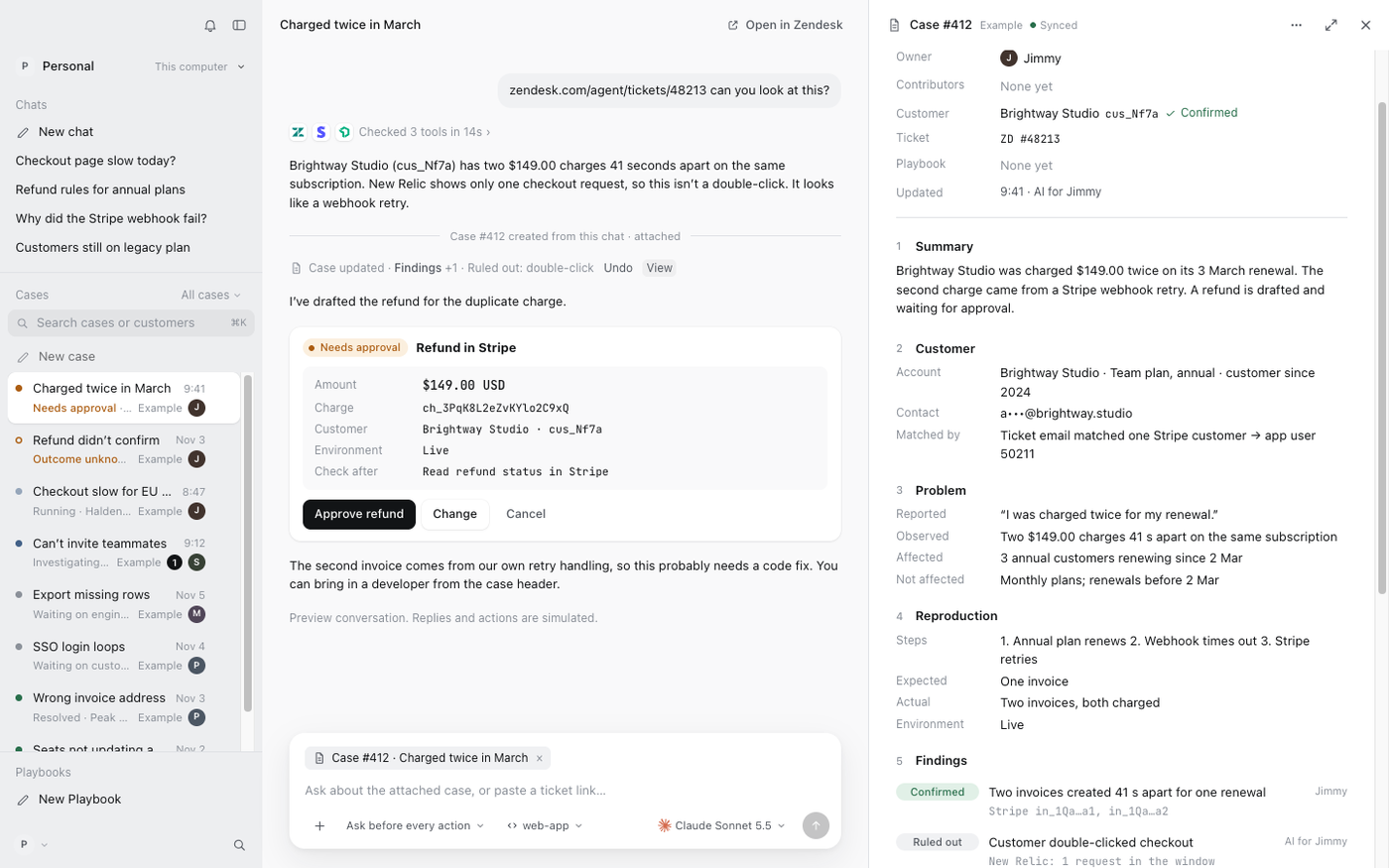
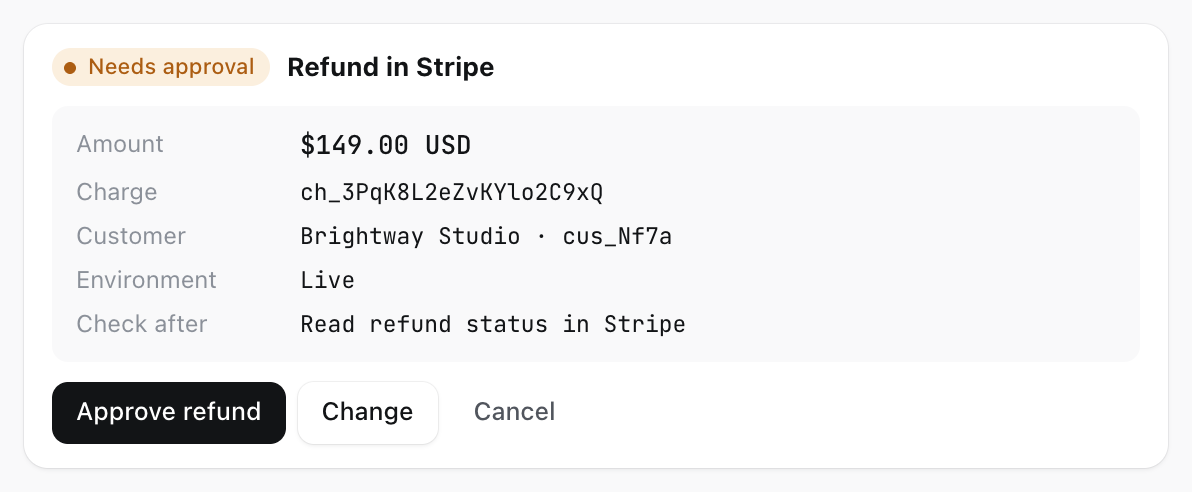
The app labels this as an example: "Preview conversation. Replies and actions are simulated." Supahelp's Connections settings list Zendesk, Stripe and New Relic.
Pricing: free for personal use. Team plans and current prices are on the pricing page.
Conclusion
A duplicate-charge ticket has four facts to get right: both charges, the cause, the refund and the reply. Rule out a double-click, find the retry, refund the duplicate, and reply with the numbers. Supahelp is built to run the whole investigation in one pass. 👇
Sources (checked 2026-11-20): Stripe Docs, "Idempotent requests" and "Webhooks" (automatic retries) · Supahelp example case #412 (preview data) · Supahelp pricing page.
Questions
How do I stop duplicate charges on Stripe?
Send an idempotency key with every payment-creating request and reuse it on retries, so Stripe returns the first result instead of creating a new payment. Also make your webhook handler safe to run twice, for example by recording each event ID before acting on it.
How long do Stripe idempotency keys last?
For API v1, Stripe may remove keys once they're at least 24 hours old. A reused key after that creates a new request.
How long does Stripe retry a failed webhook?
In live mode, up to three days with exponential backoff, according to Stripe's webhook docs.
The customer sees two charges but Stripe shows one. Why?
Often one is a pending authorisation that hasn't dropped off their statement yet. Confirm in Stripe and tell them it will disappear.
Should I refund or wait for a dispute?
Refund the confirmed duplicate quickly. A dispute adds a fee and more work for both sides.
Founder of Supahelp, the desktop app built to check your helpdesk, billing, logs and code for a support ticket and to ask before it changes anything.
 Attio MCP
 Connectors