
 Dispute
On this page
Respond before the deadline (usually 7 to 21 days, depending on the card network), answer the specific dispute category, and submit evidence that disproves the cardholder's claim: the order, delivery or usage records, your customer conversations, and your policies. If you miss the deadline, you lose automatically.
Support often has the best evidence (the conversations) but not the access or the time to assemble it. Here's how to do it quickly. 👇
Key takeaways
- The clock matters most: usually 7 to 21 days; no response means you lose.
- Answer the category: each dispute category has its own evidence requirements in Stripe.
- Enquiries are cheaper: resolve a pre-dispute enquiry and there's no dispute fee.
- Talk to the customer: Stripe recommends contacting them; a resolved complaint can lead to a withdrawn dispute.
- ✨ Supahelp is another option: it is built to gather the evidence from your helpdesk, logs and Stripe in one case, on your own Claude plan.
How do Stripe disputes work?
When a cardholder files a formal dispute, the card network debits Stripe, and Stripe debits the disputed amount plus a dispute fee from your account, then walks you through submitting evidence.
Some networks start with an enquiry: the bank asks for clarification, often because the cardholder doesn't recognise the charge. You can resolve it without a dispute fee by providing evidence that answers the enquiry. If an enquiry stays open 120 days without escalating, Stripe marks it closed.
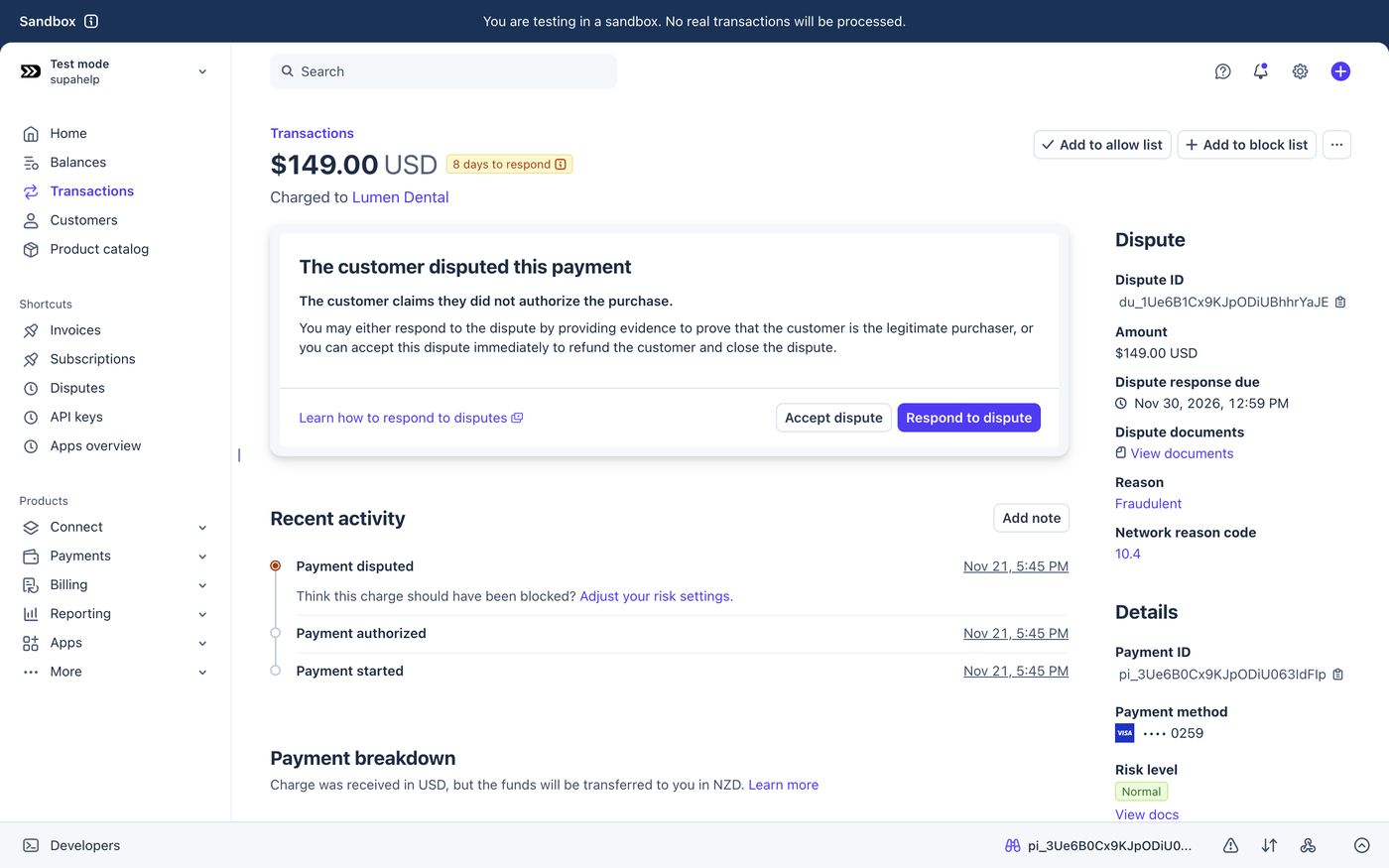
Step 1: Check the category and deadline
Open the dispute in Stripe. Note the category (for example, duplicate, fraudulent, product not received) and the response due date.
Step 2: Contact the customer
Stripe recommends reaching out; it can explain the complaint and sometimes leads to a withdrawal. Keep a record of every message.
Step 3: Pull the evidence
What support can usually collect:
- Conversations from your helpdesk showing what the customer asked and was told
- Usage or delivery records: logins, exports, API calls after purchase
- Order and receipt details: what was bought, when, and the terms shown
- Policies: refund and cancellation pages as they were at purchase
- Earlier refunds or credits for the same issue
Step 4: Decide: accept or challenge
If the claim is valid (a real duplicate, for example), accepting can be right. If not, challenge with evidence that addresses the category directly.
Step 5: Submit before the deadline
Submit through the Dashboard or the API. Stripe notes that for some fraud disputes it provides much of the evidence automatically, such as for liability-shift or Visa Compelling Evidence 3.0 eligible cases.
How Supahelp helps with disputes
Supahelp is built to collect dispute evidence from your helpdesk, logs and Stripe into one case, and to draft the response for you to review.
It's a desktop app for Mac and Windows that runs on your own Claude or ChatGPT plan, or an API key. It's built so you can paste the dispute or ticket link and have it find the customer's conversations, usage records and charges, summarise them against the dispute category, and draft the evidence text. You review and submit.
Pricing: free for personal use. Team plans and current prices are on the pricing page.
Conclusion
Winning a Stripe dispute starts with the deadline and the category, then evidence that answers the claim. Support's conversations are often the strongest evidence. Supahelp is built to pull it together so you can respond in minutes, not days. 👇
Sources (checked 2026-11-20): Stripe Docs, "How disputes work" and "Respond to disputes".
Questions
How long do I have to respond to a Stripe dispute?
Usually 7 to 21 days, depending on the card network. Check the due date on the dispute in Stripe.
What happens if I don't respond?
You automatically lose the dispute and can't retrieve the disputed funds.
Is there a fee for Stripe disputes?
Yes, Stripe debits a dispute fee with the disputed amount. Enquiries resolved before becoming disputes don't incur it. See Stripe's pricing for current fees.
Can a customer withdraw a dispute?
Yes. Stripe suggests resolving the complaint amicably, for example with a credit or replacement, and asking the customer to withdraw it.
Founder of Supahelp, the desktop app built to check your helpdesk, billing, logs and code for a support ticket and to ask before it changes anything.
 Ticket 48213
 Attio MCP
 Connectors