
 Webhook deliveries
On this page
In live mode, Stripe retries a failed webhook delivery for up to three days with exponential backoff, and shows the next retry time in the event destination's Event deliveries tab. You can resend an event manually from the Dashboard for up to 15 days, or with the Stripe CLI for up to 30 days. If retries keep failing, the cause is almost always on the receiving side: the endpoint is down, slow, or returning an error.
When a customer says "your webhooks stopped working," support usually forwards it to engineering. Here's how to find the cause first. 👇
Key takeaways
- Live mode: up to 3 days of automatic retries, with exponential backoff.
- Manual resend: Dashboard up to 15 days, CLI up to 30 days after the event.
- Resending doesn't cancel automatic retries, even if your resend succeeds.
- The status code tells the story: timeouts, 4xx and 5xx point to different causes.
- ✨ Supahelp is another option: it is built to check Stripe, your logs and the ticket together, on your own Claude plan.
How do Stripe webhook retries work?
Stripe attempts to deliver each event to your destination for up to three days in live mode, backing off exponentially between attempts. In a sandbox, it retries three times over a few hours.
Manual retries: click Resend on an event in the Dashboard (up to 15 days), or run stripe events resend <event_id> --webhook-endpoint=<endpoint_id> (up to 30 days).
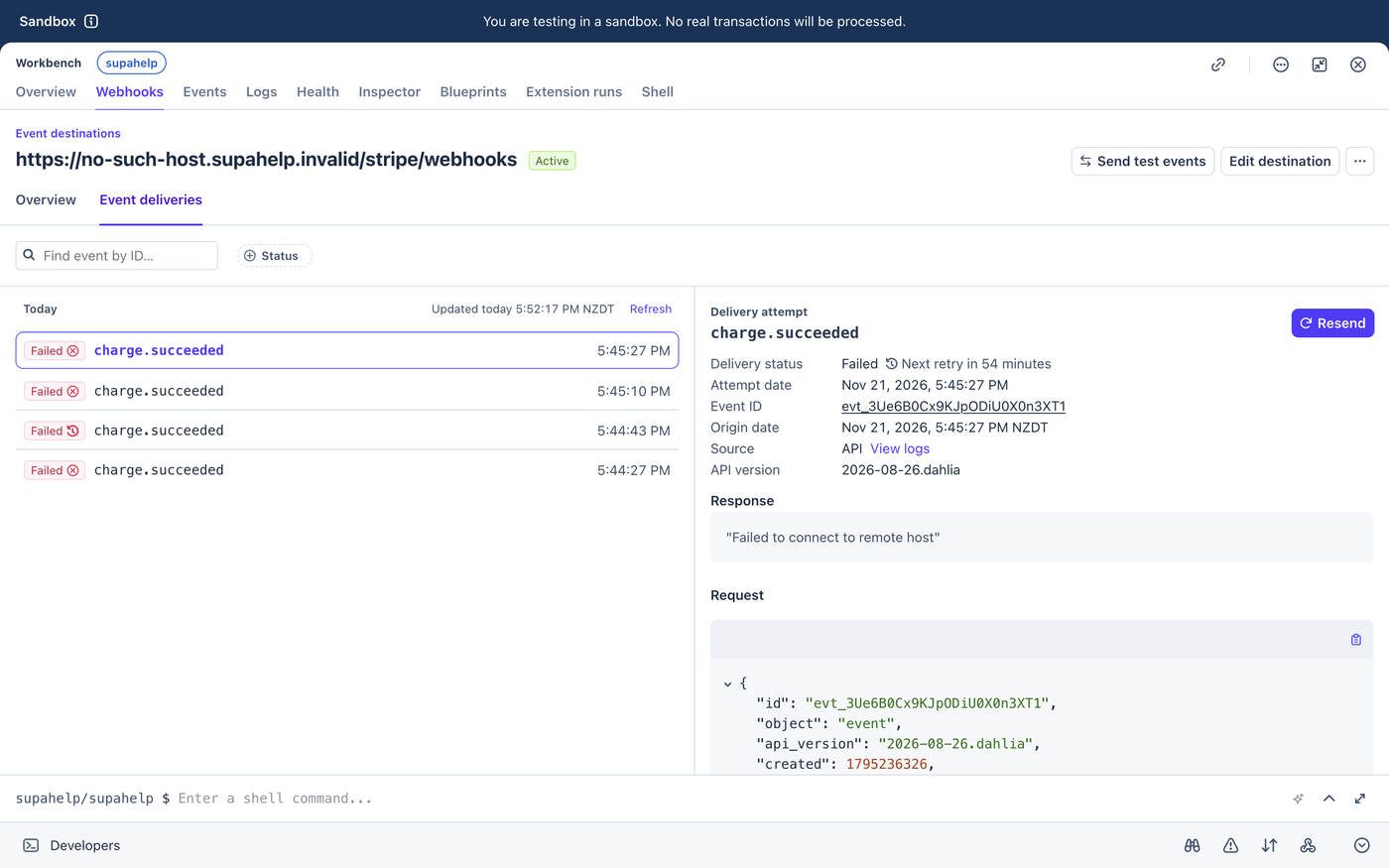
Step 1: Find the failing endpoint and time
In the event destination, note when failures started and the response each attempt got.
Step 2: Read the response
- Timeouts: the endpoint is slow or doing too much work before replying.
- 4xx: often a signature verification problem or a removed route.
- 5xx: the receiving app is erroring; check its logs and error tracker.
Step 3: Check what changed
Deploys, secret rotations, firewall changes and certificate renewals around the first failure are the usual suspects.
Step 4: Resend once it's fixed
Resend the missed events (Dashboard up to 15 days, CLI up to 30). Remember automatic retries continue regardless.
Step 5: Reply with specifics
Hi Sam, deliveries to your endpoint started failing at 14:02 UTC yesterday with a 401, right after your signing secret was rotated. Once you update the secret, we'll resend the 37 missed events.
How Supahelp handles this ticket
Supahelp is built to investigate "Webhook retries failing" across Stripe, your logs, Sentry and the ticket, then draft the reply and the fix.
It's a desktop app for Mac and Windows that runs on your own Claude or ChatGPT plan, or an API key. It's built to find the first failure, read the responses, check logs and recent deploys, and draft the customer reply and any engineering issue. Nothing is resent or sent until you approve.
Pricing: free for personal use. Team plans and current prices are on the pricing page.
Conclusion
Stripe retries live-mode webhooks for up to three days, so most webhook tickets are about why the receiving side failed. Find the first failure, read the response, check what changed, then resend. Supahelp is built to do that investigation across your tools in one case. 👇
Sources (checked 2026-11-20): Stripe Docs, "Webhooks" (automatic and manual retries).
Questions
How long does Stripe retry webhooks?
Up to three days in live mode, with exponential backoff. In a sandbox, three times over a few hours.
Can I resend a Stripe webhook manually?
Yes: from the Dashboard for up to 15 days after the event, or with the Stripe CLI for up to 30 days.
Does a manual resend stop automatic retries?
No. Stripe says manually resending doesn't cancel automatic retries, even if it gets a 2xx response.
Founder of Supahelp, the desktop app built to check your helpdesk, billing, logs and code for a support ticket and to ask before it changes anything.
 Ticket 48213
 Attio MCP
 Connectors