Your team and Supa, working together.
Keep requests, conversations, and customer history in one workspace and meet Supa, your AI coworker, who can help you manage it all.
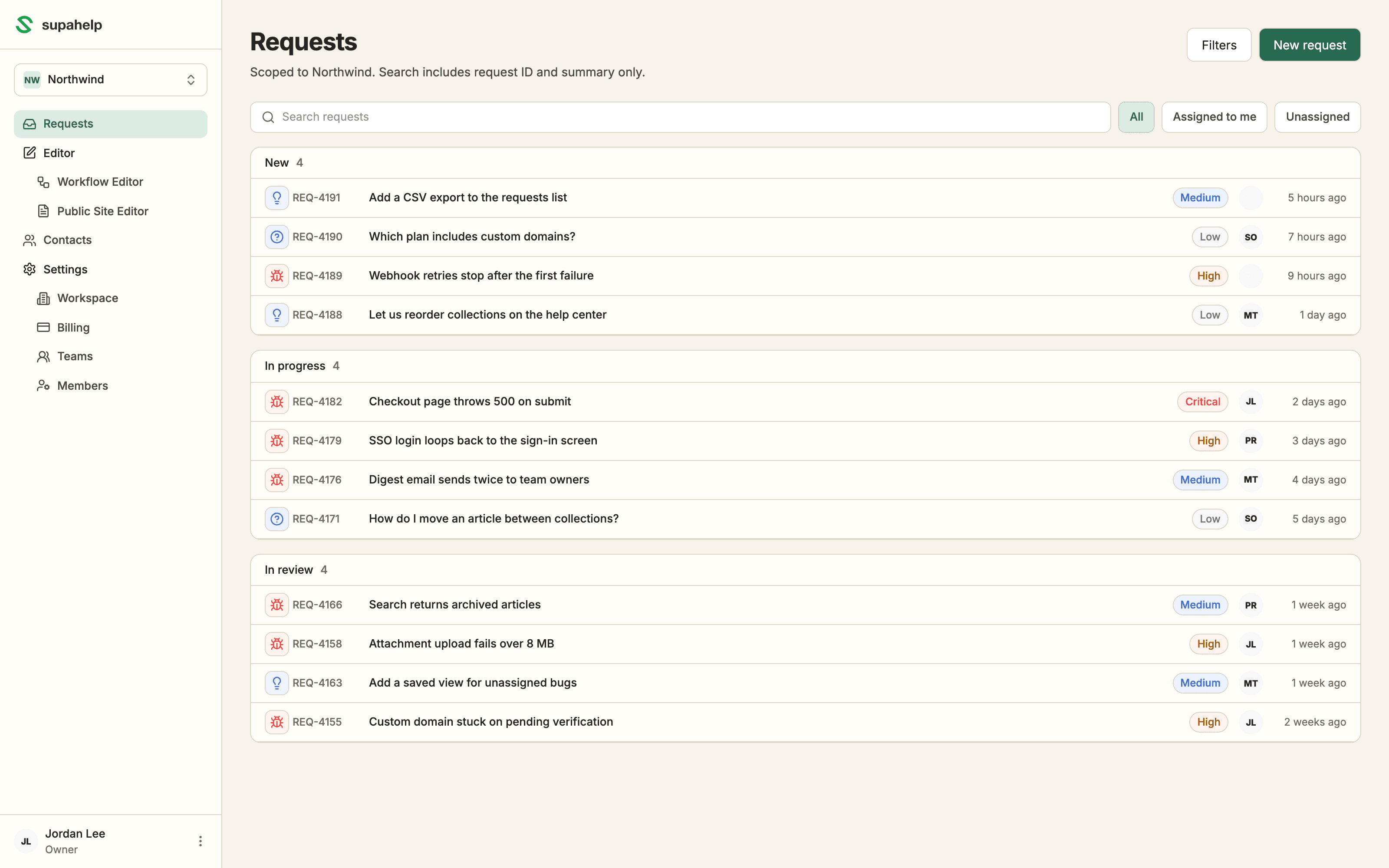
What your team sees first: every request grouped by status, with owner, severity, and age at a glance.
How it works
One queue, one place to work it.
Every support request lands in the same queue, whether it came from your help center's request form, a customer's reply to an email, or you logged it by hand.
Open a ticket and everything is on one screen: the answers the customer submitted, the internal thread your team works in, and the ticket properties on the side.
What it does
Built for whoever handles the support tickets.
Every request is streamlined from submission to resolution.
One queue
Search by ID or summary
Search for an ID, or a few words from the summary.
Clear status view
Track requests by their status at a glance.
Assign with context
Assign requests to the right person with all the necessary context.
Fast triage
AI summary
Get a concise summary of the request generated by AI.
Group linked requests
Using AI, we link related requests together to avoid duplicate work and suggest next actions.
Route to a team
Hand a request to another team without losing sight of it.
Work it together
Clear ownership
Each request has a clear owner, making it easy to see who is responsible.
Internal comment
Collaborate with your team directly on the request.
Records stay on the request
Context and attachments are preserved.
History
Full activity timeline
Every status change, assignment, and comment, with who did it and when.
Email customers directly
Send and receive email without leaving the request. Replies land on the same one.
History by contact
Every request a person has filed appears on their record.
Who it's for
Why teams outgrow the shared inbox
A shared mailbox holds up until the volume, or the team, outgrows it.
SaaS support teams
Requests arrive in an email inbox
Keep every request visible with a status and an assignee. Supahelp connects the conversation, customer, and next step.
Every request has an owner
Product and ops teams
Individual requests need to be reviewed fully until you realize the ticket is the same as another one already in the queue
An email inbox can’t tell you whether a request is a duplicate. Each request here carries its type, severity, team, and the contact who filed it, so a weekly triage works.
Quickly identify duplicates
Solo founders
You are the entire support team
Time is limited, and you need a system that helps you keep track of every request without adding extra overhead.
One workspace for support
Frequently asked questions
Can Supa handle requests for me?
Yes. Ask Supa to send a reply or update a request. Supa prepares the change, and nothing happens until you approve it.
How do support requests get into the queue?
Requests from your published help center's request form, replies to customer emails, and requests your team logs by hand all arrive in the same queue.
Can customers see internal notes on a ticket?
No. Internal comments and the activity timeline are visible only to your team. Customers see only the replies you send them.
Can I assign support requests to a team or agent?
Yes. Route any request to a team, set an assignee and a primary follower, and filter the queue by any of them.
Is there an audit trail for each support request?
Yes. Every status change, reassignment, property edit, and comment is recorded on the request's activity timeline with the person and the time.
Do I need engineering to manage support requests?
No. Support and product teams can run the queue without an engineering dependency.
Read the Supa approval workflow or connect your coding agent through MCP.