The right context for every request.
When customers need more information on top of what your knowledge base provides, they can contact your team via a customized support request form. Ask the right questions to get the information you need to help them.
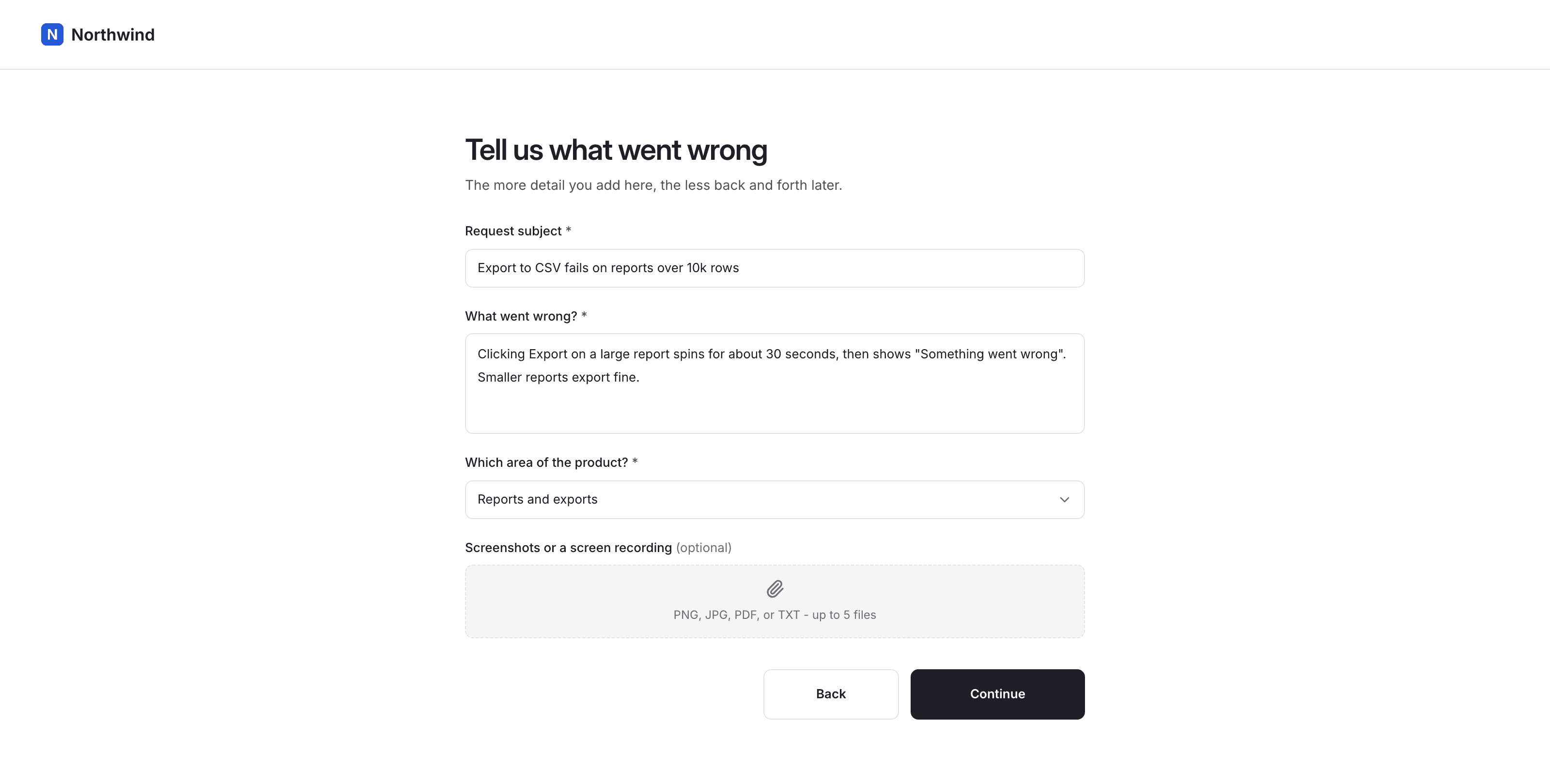
What your customers see: they pick a request type, then answer a short page of questions.
How it works
Ask the right question and give the right answer.
Every request starts with a type: bug report, help, feature request, or feedback. Each type has its own follow-up questions, grouped into pages, that you arrange in the same workspace that handles the replies.
They answer targeted questions and leave their name and email. Every answer and attached file lands on the request as structured context, so your team doesn't have to guess what the customer asked.
What it does
Helps you figure out the right context
Most follow-up questions are the same, so ask them up front.
Intake
Four request types included
Bug report, Help, Feature request, and Feedback, each with its own questions.
One page of questions at a time
Group questions into pages instead of one long form.
Linked from your help center
When an article isn’t enough, readers get a link to the form.
Question types
A field type for each kind of answer
Short and long text, number, single and multi-select, date, and file upload.
Required or optional
Decide which answers you can’t start work without.
Edit and republish anytime
Existing requests keep the version they were submitted on.
Context on arrival
Answers stored per question
Each answer sits under the question that asked for it.
Customer files attached
Screenshots, recordings, and logs land on the request.
Automatic summaries
Supa, the built-in AI agent, summarizes the thread when a request is assigned.
Publishing
Draft in private
Build and preview a request form without touching the live one.
Published versions never change
Old requests keep the questions they were asked.
Nothing to embed
The form lives on your domain. No script or iframe to install.
Also included. Contact matching, protection against duplicate submissions, and all four request types on every paid plan.
Who it's for
Why teams put a form in front of support
Different reasons, same problem: requests arrive with too little detail to act on.
SaaS support teams
Every bug report starts with three follow-up questions
Which browser, which account, what did they expect? You need to send the same clarifying reply over and over before anyone can start. A form asks all of it up front.
Fewer clarifying replies
Product and ops teams
Feedback and feature requests arrive as one-line emails
Each one is a sentence you have to interpret, then chase. Structured forms with request types and required questions give you something you can read, sort, and route.
Support customers without chasing
Solo founders
You are the one reproducing every bug
When you are the whole support team, a vague report can cost you an afternoon. Ask for the steps, the expected result, and a screenshot on the form instead.
Cost-effective support
Frequently asked questions
What types of support requests can customers submit?
Four, and they are fixed: Bug report, Help, Feature request, and Feedback. You configure the questions for each one.
Can customers submit a support request without an account?
Yes. The request form is public. Customers give their name and email, which Supahelp matches to an existing contact or uses to create a new one.
What field types can I add to a support request form?
Short and long text, number, single-select, multi-select, date, and file upload. Every request also captures a subject line.
What happens to existing requests when I edit a form?
Nothing. Each published version is immutable. Requests stay attached to the version they were submitted on, with their original questions and answers.
Do I need to embed a widget or script on my site?
No. The form is hosted on your own domain alongside your help center. You link to it, and there is no script or iframe to install.
Can customers attach files or screenshots to a request?
Yes. Add a file upload question and customers can attach screenshots, recordings, logs, or PDFs directly to the request.